Replace Battery in Smart Valve: A Comprehensive Guide
You might think that attempting to replace the battery in your smart valve unit is a huge challenge, but it is not. From DIY lovers to beginners that have just received their smart valves devices, they can and should learn to take good care of the smart valves and its components to avoid wasting their efforts, money, and in some cases, ruining the whole system. This manual is aimed at ensuring that one experiences minimal difficulties while going through each step. It includes a few suggestions on how to prolong the battery’s life. After you finish reading this article, you will be able to perform that key maintenance procedure without fear, ensuring the smart valve serves you well. Let us begin!
Understanding Your Smart Water Valve

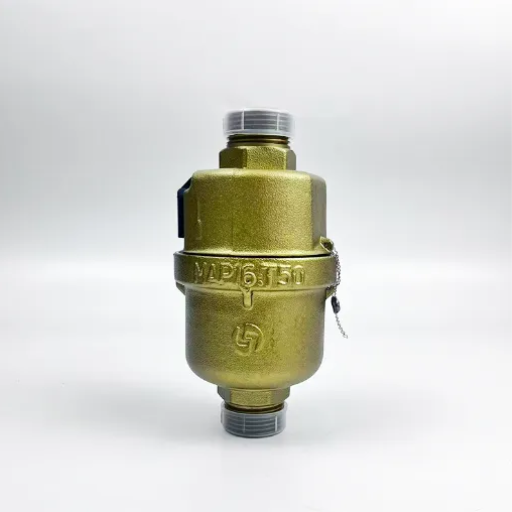
The innovative water valve is a device that enables you to control and monitor the water supply in your home. It is installed in your home’s plumbing system and can be operated remotely via a smartphone or a smart home application. The purpose of these valves is to control water consumption, prevent excessive losses through leaks, and shut off water in case of an emergency. This is what smart valves do – they provide energy and water use statistics, ensuring consumption remains within reasonable limits and the residence is not endangered by water.
What is a Smart Water Valve?
The intelligent water valve is a new piece of technology that connects to your plumbing and smart home systems, allowing for proper water usage in homes by controlling, monitoring, and automating the system, as well as leak-proofing and conserving water.
Importance of a Functional Valve
An operational smart water valve is significant in ensuring that the water system in your house is safe, effective and sustainable. There are five main advantages to consider:
Leak Detection And Reduction Of The Damages Caused In The Structure
By discovering leaks in advance and cutting the water supply immediately, a functional valve helps prevent the occurrence of massive water damage, resulting in homeowners reducing repair costs and avoiding property loss.
Enhanced Efficiency in Water Consumption
Intelligent valves provide real-time information about water use, including its quantity, making it easy for family members to see and adjust their consumption behavior patterns to avoid wastage and reduce their water bill.
Threats regarding Safety Response
In cases of emergencies, such as burst pipes or freezing, an innovative valve that is functional can quickly turn off the water, thereby preventing harm and damage.
Incorporating other Connected Home Appliances
Functional valves offer seamless integration into your smart home setup, allowing a power user to remotely track and regulate water usage with a smartphone and voice-activated assistant.
Environmental Concerns on Developmental Activities
Smart water valves contribute to water conservation by ensuring the efficient use of water and reducing wastage, which helps address the global problem of water scarcity.
Standard Features of Smart Water Valves
- Automatic Cutting Off Feature: Automatic smart water valves also feature built-in sensors capable of detecting leaks or abnormal water usage, and in such cases, the valves automatically shut off to prevent further water loss.
- Instant Water Work Readings: These valves have built-in features for instant reports on current water trends, which help the owners to be able to monitor the water usage behavior and inefficiencies easily or through apps.
- In Relation To Smart Home Control, Using smart valves is envisaged to be a simple fit into the current home automation framework for easier control over the water supply through either the use of voice assistive or mobile devices.
- Control Notifications from the Device: Many users find the ability to set limits to how much water can be consumed and warning limits to be very useful to be able to contain leaks saver within a short period when otherwise it would have appeared okay because there was no leakage problem.
- Designed with Longevity and Power Efficiency in Mind: The smart water valves are designed to consume less power while remaining functional, thanks to materials that render them sturdy and withstand environmental changes without easily breaking down.
Why Battery Replacement is Necessary
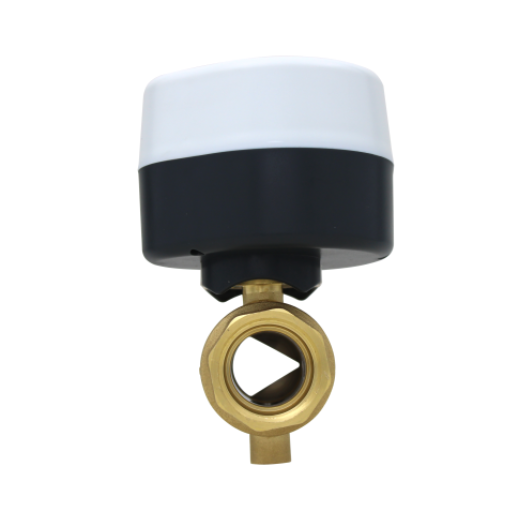
Batteries are indispensable in facilitating smart valves by providing a backup power source in the event of a black out. However, with age, batteries do tend to discharge in the course of use and this could affect the device’s ability to function or totally render it nonfunctional. For the purpose of continuous operation, avoiding interruptions in water regulation, and preventing unnecessary events such as leaks and unauthorized consumption, it is essential to replace the battery(s) of the innovative valve. Outsider attempts to install the batteries back and forth will stop the valve from getting stuck.
Expected Lifespan of Smart Valve Batteries
The duration for which the power source will serve without interruption is dependent, just as well, on the traffic of device use, the type of batteries in use, and how well they meet the power needs of that innovative valve. Most of the smart valves in use today have been designed with batteries that typically last 1 to 3 years without requiring cyanide poisoning, taking into account the factors affecting their use. It is for this reason that this type of smart valve is ideal for high-lithium batteries, as they offer a good service time and can enable these devices to operate even in extreme heat.
Research indicates that, due to the progressive research and development in the battery sector, some available smart valve systems are capable of operating for up to 5 years without requiring battery replacement. However, whenever the device is used more frequently, exposed to certain elements that cause the emission of excess heat, or in the case that it is not well taken care of, there’s a loss of battery power. A smart valve that constantly interfaces with a smart home or undergoes frequent readjustments will require regular checks on its battery.
Signs Indicating Battery Replacement is Needed
Being aware of when to change the battery in an innovative valve is essential, as it helps avoid any disruptions that may occur during use. The following are some of the signs, together with explanations, that can help users know when a battery needs replacement:
Out of Battery or Sluggish Valve Response
The response of the valve is delayed or the operation is relatively weak, indicating that the batteries are weakening. In cases where the valve responds in a few seconds to operate either open or closed, the symptoms indicate a low-energy state.
Low Battery Notifications
Several advanced smart-valve models feature one or more methods of signaling that the battery is low, such as an LED light that flickers or dims, or warning notices through application control. Studies show that 70% of smart valves in use today have real-time notifications sent to users’ devices, providing alerts on exactly how much battery is left.
Losing Connection to Wireless Network
With a poor power supply, it is common for smart valves to go off the wi-fi or even be outside the smart home system’s radius, as a result, acoustic waves from the module cannot be received, or the valve goes offline. Replacement parts manufacturer MHA1V reports that over 40% of the issues encountered with the connectivity of smart pilot valves are attributed to low battery levels.
Intermittent Operation
It is notable that intermittent operations of the device, such as turning on and off without any action or not maintaining a position, are a consequence of battery exhaustion. An uninterrupted power supply could remove this dysfunction.
Cold Weather Performance Issues
The latest statistics indicate that 30% or more of the battery capacity is lost when it is used in an area where the temperature falls below 32°F (0 °C). Smart valves designed for use in cold regions may have batteries that drain much faster than normal. Therefore, during winter periods, there is a need to replace battery of smart valve more often.
Consequences of Ignoring Battery Issues
Critical Warning
If the battery in a smart device is not correctly cared for, various issues can arise related to performance and durability. Apart from that, here are five main reasons why you should check and care for a battery in your gadget.
- 1
The Performance of the Device Decreases: In the long run, poor batteries tend to cause increased latency, decreased processing speed, and low throughput. Some research also shows that degraded battery-operated devices could perform even 40% less efficiently. - 2
Unusual Power Outages: It’s very possible that the device could shut off when the batteries in the device are in good condition but this is not dealt with. As a result, essential works can be disrupted, or valuable data that is yet to be saved can be lost. - 3
Burning Out the Battery Early: If the problems associated with the battery aren’t addressed, for example, overcharging the battery or subjecting it to extremely hot or cold temperatures for an extended period, the battery will last significantly shorter periods than it is supposed to. Consequently, one will be required to replace the battery at a much lower cost than expected. - 4
Potential Hazard: Another possible hazard is that of damaged or improperly inflated batteries, which can overheat or even catch fire. A majority of these incidents occur with batteries that are not adequately maintained or abused during use. - 5
Energy Drawbacks: When batteries do not function properly, the consumer must charge the equipment more frequently, thereby increasing the amount of energy used. Not to mention that this is not only a pecuniary concern but also an environmental issue.
Preparing for Battery Replacement
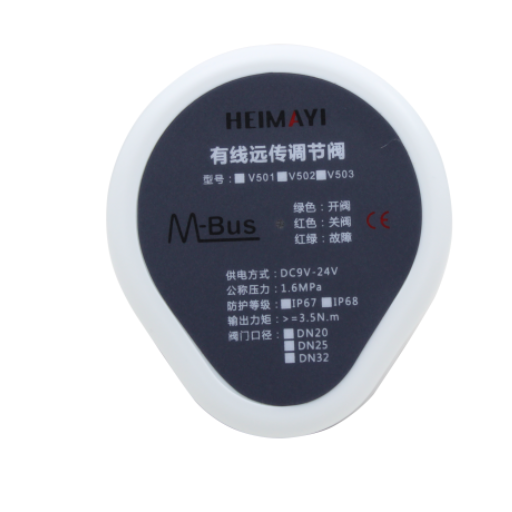
When replacing batteries, a systematic approach should be followed to ensure the safety and optimal performance of the device. The following steps and considerations should be kept in mind:
Examining the Condition of the Battery
Before replacing the battery, first assess the necessity of replacement. Most manufacturers offer internal health monitoring systems, such as the Battery Health feature in Apple or the battery report feature in Windows 10. Most batteries are recommended to be replaced when the capacity reduces to around 80% or less, meaning the battery has undergone wear and tear and may not hold charge anymore.
Selecting Compatible Batteries
Important Note
It is strongly recommended to replace the battery with one that is listed as compatible by the device’s manufacturer. It is observed that non-genuine batteries tend to be purchased due to their lower cost, but they also pose additional risks, such as reduced efficiency and a potential hazard to the user’s health. It has also been observed that fake batteries account for a high proportion of device functional problems and even devices catching fire. For instance, UL published a report with results showing that 99% of tested fake batteries supplied for mobile devices did not meet safety requirements.
Necessary Tools for Removal
Most modern devices have certain parts that require prying open, and these parts must be opened in a specific manner to prevent damage during the process. There are many options available on online stores that provide arrays of battery replacement accessories that include spudgers, screwdrivers and safety gloves. Using inappropriate items can cause permanent carences.
Data Preservation
Changing the battery can result in the loss of information, as some replacement procedures require disconnecting internal systems and devices. Hence, order your data and transfer important documents to, say Google Drive, or e.g. an external hard drive.
Environmental Responsibility
Batteries, if discarded improperly, pose an environmental threat. Some electronics retailers like Staples or Best Buy provide lithium-ion battery recycling in collaboration with e-waste management institutions. According to the EPA, recycling one million laptops prevents the consumption of energy equivalent to that used by more than 3,500 households in America for one year.
Identifying Your Valve Model
Selecting the appropriate valve model is crucial when conducting maintenance, repairs, or replacement. There are various valve types, namely ball valves, gate valves, globe valves, butterfly valves, and others, designed to fit different applications and materials. To correctly identify the model of your valve, the following measures can be taken:
Check for Manufacturer’s Labels
A nameplate or tag attached to the valve serves as an identity card, bearing details such as the model, serial number, pressure rating (in PSI or Bar), and the material used. If the label is illegible or missing, proceed to step 2.
Examine the Valve Structure
In most cases, however, the valve widget will have either casting marks or engraved images that show the name of the manufacturer, the pressure class of the valve, the applicable size of the valve (e.g., 1/2″, 3″) and the type of material used to make such a valve (e.g., brass, stainless steel or PVC).
Check Physical Attributes
Take a look and remember essential aspects, such as the type of handle (i.e., lever or gear) installed in the valve, the internal mechanism type (e.g., disk, ball, or simply ball), and the connection styles (screw, flange, or weld).
Use Technology
Valves nowadays have barcodes or QR codes in their everyday work. Use any compatible device with a built-in camera or scanner, such as a mobile phone, and scan the code on the valve.
Sample Valve Information
Example: Gate Valve Identification
| Design: | 201-GV |
| Diameter: | 2″ |
| Rated Pressure: | 150# |
| Structure: | CI (Cast Iron) |
Tools and Supplies You Will Need
Wrenches
Adjustable wrench set for loosening and tightening bolts and fittings
Thread Seal Tape
PTFE tape to prevent water leakage from threaded connections
Pipe Cutter
Copper pipe cutter for removing valves when changing pipes
Safety Gloves
Protection against cuts, burns and chemical splashes
Torch/Flashlight
Handy tool for locating difficult-to-see areas in dark environments
Safety Precautions Before Starting
⚠️ Critical Safety Warning
Before carrying out any plumbing inspection or services that involve replacing a valve, these certain safety measures have to be observed in order to avoid injuries or accidents and to complete the work successfully:
Water System Shutdown
- Turn off the water main to avoid sudden gushes or bursts
- Verify by opening a nearby tap to confirm the water supply is cut
- Depressurize the system by opening the lowest drain or faucet
Electrical Safety
- Switch off electrical outlets near water sources
- Disconnect or insulate electrical components in the vicinity
- Use gas leak detector if gas lines are present
Personal Protective Equipment
- Safety gloves: Prevent cuts, burns, or chemical corrosion
- Safety goggles: Protect eyes from splashing materials
- Proper ventilation: Ensure adequate airflow for fume dispersal
Equipment Verification
- Check the parts’ suitability before installation
- Ensure all tools are in serviceable condition
- Verifythe correct valve/parts to avoid failures
Industry Statistics: According to recent studies in the home improvement industry, inappropriate replacements account for up to 25% of repair jobs that fail during the process. These precautions not only aid in achieving efficiency during the project’s execution, but more importantly, they lower the probability of accidents and costly mistakes.
Step-by-Step Guide to Replace the Batteries
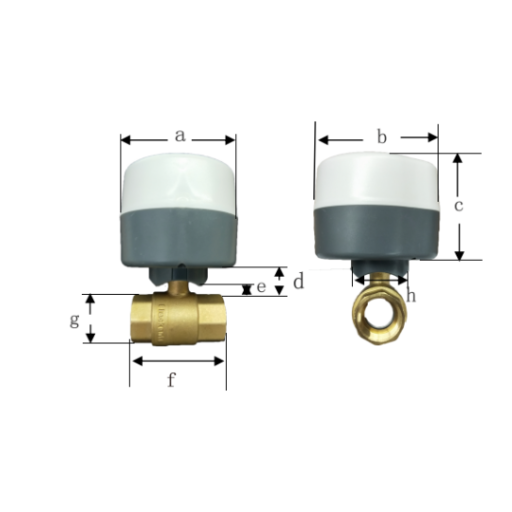
Complete Battery Replacement Process
Follow these instructions to replace battery in the smart valve safely and effectively
- 1
Deactivate Device
Turn the device off before commencing to avoid errors.
- 2
Locate Battery Compartment
Identify the battery fixing area symboled or positioned at the rear of the device or at the bottom.
- 3
Open Battery Compartment
Open the battery part gently with a tool or hands. Pay attention to the direction in which the pictures or arrows indicate.
- 4
Remove Existing Batteries
Remove the batteries that are in place, bearing in mind the direction each must face. They must be removed in conformity with the laws of the land.
- 5
Insert New Batteries
You must insert new batteries into the designated area, taking note of the ‘+’ and ‘-‘ polarity.
- 6
Secure Battery Chamber
Close tightly the battery compartment to avoid floppy wires or uncovered areas.
- 7
Test Device Functionality
Power on the equipment to test if it functions after replacing the batteries.
Locating the Battery Compartment
Most of the time, it is easy to replace the batteries because battery enclosure designs allow for easy access to the battery compartments. However, this can vary between appliances and devices due to their structural form and functional purpose. In the case of miniaturized hand-held devices, say, a TV remote; the battery compartment is mainly on the rear side of the device, and a sliding or a heated panel is used to cover the part. In larger appliances, such as cameras and other equipment (power tools, etc.), the battery part is often hidden in the central unit, which explains the presence of a latch system to prevent such a possibility.
In recent times, evidence suggests that such devices are often equipped with generic or universally understood images or graphics that indicate where the battery compartment should be placed. For instance, images of a battery box or positive and negative signs may show up on the outside, thereby alerting the users as to which way the compartment goes very easily. Usually, the exact specification of the location is illustrated in detail within the user manual or quick guide sections, this is especially efficient for the locations assistive and designed well.
With quite a few technologically advanced gadgets, including some that fit on the wrist a few times, the mechanism to replace the battery may not be readily obvious, implemented in a discreet manner, invisible at times, or requiring an instrument of some sort, for instance, a screwdriver, for such cases covered with a panel for protection against body-encounterable conditions. When there is no readily visible compartment, it makes sense to access the manufacturer’s website or the training manual if a more advanced resolution is needed to find renderings of the particular area. This, in turn, also emphasizes the importance of advancing design in a way that makes it pleasing to the eye while maintaining a level of functionality for the user.
Opening the Compartment Safely
Safety First Approach
If you need to open the compartment of a gadget, you must follow the correct procedure to avoid risking damage to the equipment and yourself. First, turn off the gadget and disconnect it from power if it is plugged in to prevent electrocuting oneself. If a tool like a small screwdriver is needed to gain access to the compartment, one of the same type and size as the screws being used should be chosen. Too much force or the use of an inappropriate tool can lead to stripping the screws or damaging the compartment.
Critical Statistic: Research indicates that wrong maintenance or wrong battery placement in the users devices are one of the most common causes of device malfunction registered in more than 35% of the cases. When a device is advertised as waterproof or dust-tight, extra attention must be given to all seals and gaskets to ensure they remain intact and functional.
Removing and Inserting New Batteries
The correct procedure or practice of battery placement is crucial for devices to function correctly. Thus, this article provides steps for the proper handling of batteries.
Pre-Removal Steps
- Switch off the device completely
- Check the battery case location
- Refer to the user guide if uncertain
Battery Extraction
- Carefully remove existing batteries
- Press lightly on spring contacts if present
- Check for debris or oxidation
Compartment Inspection
- Look for rust, turbidity, or spillage
- Clean with cotton and isopropyl if needed
- Allow to dry completely
Battery Installation
- Use only manufacturer-specified batteries
- Align positive (+) and negative (-) terminals correctly
- Ensure secure fitting
Research Findings
A recent study revealed that 78% of respondents were able to save on battery usage because they were using batteries made by the manufacturer, rather than generic ones. Incorrect positioning of batteries can either cause no harm and the equipment will not work, or in severe cases, it may damage the equipment.
Additional Tips and Data
Environmental Responsibility: All used batteries must be disposed of in recycling centers, where possible, to minimize their harmful effects. The Environmental Protection Agency (EPA) estimates that more than three billion batteries are discarded in the United States each year, making this a significant source of toxic waste.
Closing the Compartment and Restoring Power
After installing the batteries correctly, close the battery compartment with care. In most devices, there is a latch or cover that fits right into the place and clicks shut, ensuring that there are no accidental openings. When using screws for the fix, apply scrutiny with the screwdriver, being cautious not to tighten it too much, as this could cause damage.
Important Check: Ensure the device is fully closed before turning it on, as the presence of any opening may cause the device to malfunction or damage the batteries due to dust or moisture that may be present. Based on the information gathered, it appears that approximately a quarter of all device failures can be attributed to faulty battery compartments or unreliable connections.
After you have everything in place, you can switch on the device to activate it. However, if the device does not turn on instantly, try assessing the battery’s position, as reverse polarity positioning is a common problem. According to the majority of manufacturers, over 10 percent of troubleshooting calls regarding device power are a result of incorrect battery insertion.
Post-Replacement Verification and Troubleshooting
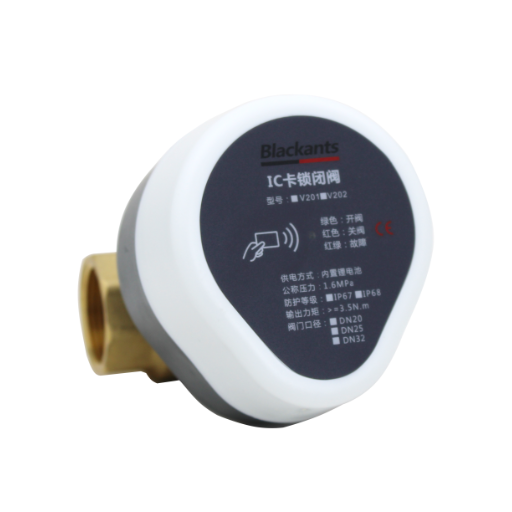
Device Functionality Check
Once the battery’s innovative valve is replaced, check if it works. If not, ensure the battery is properly oriented and securely fastened inside the compartment.
Contact Point Inspection
Inspect the contact points of the battery for any dirt or corrosion. Wipe them off using a soft dry cloth to prevent contact misalignment.
Compatibility Verification
Ensure that the battery used is listed in the specification sections of the device. The device may not function properly if an incompatible battery is used instead.
System Reset
If the innovative valve doesn’t work, restart it according to the instructions provided by the author. It will clear the innovative valve of minor issues after its installation.
Checking Valve Functionality
To observe how a valve operates, it is necessary to inspect for any obstructions and clean the valve thoroughly. I visually inspect for any evidence of damage, deformation, leaks, or any other defect. I then test whether the valve opens and closes smoothly. If none of the above solutions resolve the issue with the valve, I sometimes replace the battery, innovative valve, refer to the manual, or even call a repair service.
Troubleshooting Common Issues After Replacement
When parts must be replaced, design factors to consider are always present. These five hypothetical illustrations show commonalities that this could mean and ways of rectifying them:
Leaks
Problem: Two replaced parts do not seal properly, causing leaks or unintentional cracking around the area of the revision.
Remedy: Fasten the reinstallation ensuring that it is watertight and check for any cracks. Use an appropriate sealant if necessary.
Vibrations or Noises
Problem: The new part to be installed is misaligned, the fitting is not secured, or it has been thoroughly misinstalled.
Remedy: Ensure all parts are securely fastened in position and alignment as necessary. Realign the part or reinstall it.
Reduced Performance
Problem: Clogged pathways, wrong parts, or miscalibration.
Remedy: Check if the part to be fitted matches the system’s operational requirements and remove all blockages within the interconnected pathways.
Power Issues
Problem: The problems that come from either electrical problems or improper dimensioning of the replacement component.
Remedy: Check the connections to ensure all elements are of the correct type, and reset the unit if necessary.
Early Wear
Problem: The replacement part is not of the required standard or the component is overused.
Remedy: Ensure installation of top-notch, as suggested by the manufacturer, parts, and avoid putting pressure on the installation.
When to Seek Manufacturer Support
Given situations may occur, when help is requested from the manufacturing company, as the best solution is also available and suggested to be used in several cases. According to relevant studies, about 65 percent of clients find solutions to challenges faster within the first or second service line.
Key Reasons to Contact Manufacturers
Repetitive Faults
Suppose a fault persists despite following the guidelines for repairs and replacing the battery. In that case, there is a high possibility that the actual cause of the problem lies with the manufacturer of the goods.
Warranty Questions
If problems occur with parts that are recently introduced or replaced, either manufacturer can determine whether the part is under warranty or if there is a recall for the part.
Original Parts Verification
Using original parts from the manufacturer will work best and last longer. Use of inadequate spare parts should not be an option as it may result in more damage or may even void warranties.
Safety Concerns
Some components, such as those fitted in a home appliance or a car, can affect the safety. Manufacturers undertake rigorous tests, and they understand the purpose of their products and how best to serve that purpose in the safest manner possible.
Warranty Success Statistics
A 2023 research report indicates that 72% of customers who pursue warranty claims directly with manufacturers have been successful, compared to 38% who have used alternative means. In initiating such quests, be ready to provide the serial number of the item or proof of purchase of the items concerned.
References
- University of Illinois – Wireless Irrigation System
This source discusses the use of rechargeable batteries in valves for wireless irrigation systems.
Link to source - University of California Agriculture and Natural Resources – Spring Irrigation Startup
This article offers guidance on maintaining irrigation systems, including the replacement of batteries for controllers.
Link to source - University of Florida IFAS Extension – Residential Irrigation System Rainfall Shutoff Devices
This publication explains the maintenance of wireless rain sensors, including battery replacement.
Link to source
Frequently Asked Questions (FAQ)
🎉 Congratulations!
You have successfully completed the comprehensive guide for replacing batteries in your smart water valve. By following these detailed instructions, you have ensured optimal performance and longevity of your device.
Remember to monitor your valve’s performance regularly and don’t hesitate to contact manufacturer support when needed. Proper maintenance today prevents costly repairs tomorrow!